This is the second article in the series on understanding how browsers work. This post focuses on the browser event loop. If you have not read part 1, start with How browser works part 1: Browser architecture. It will make this article easier to follow.
The main thread in the browser
In the browser, our application runs inside a renderer process, and the renderer's main thread is single-threaded. The main thread is the entry point for the app. It runs our code and handles page rendering.
Here is the issue: because the main thread is single-threaded, if our code includes expensive work such as network requests (fetch or XMLHttpRequest), timers (setTimeout), or user interactions (clicks, etc.), and the main thread waits for that work, then the page becomes sluggish.
All of those expensive operations are input/output (IO). In programming, concurrency typically uses two models:
- Synchronous model: IO operations are blocking, so concurrency usually relies on multiple processes/threads.
- Asynchronous model: IO operations are non-blocking. The programming model is often single-threaded. The main thread runs code, while asynchronous IO is handled in the background.
Browsers clearly choose the second model. The main thread runs only synchronous tasks, while asynchronous IO happens underneath in the browser engine.
So the next step is to understand which components and mechanisms the browser provides to let the main thread handle concurrent tasks efficiently without blocking responsiveness and rendering.
Event loop
The browser's event loop uses the following components to keep the main thread efficient and responsive.
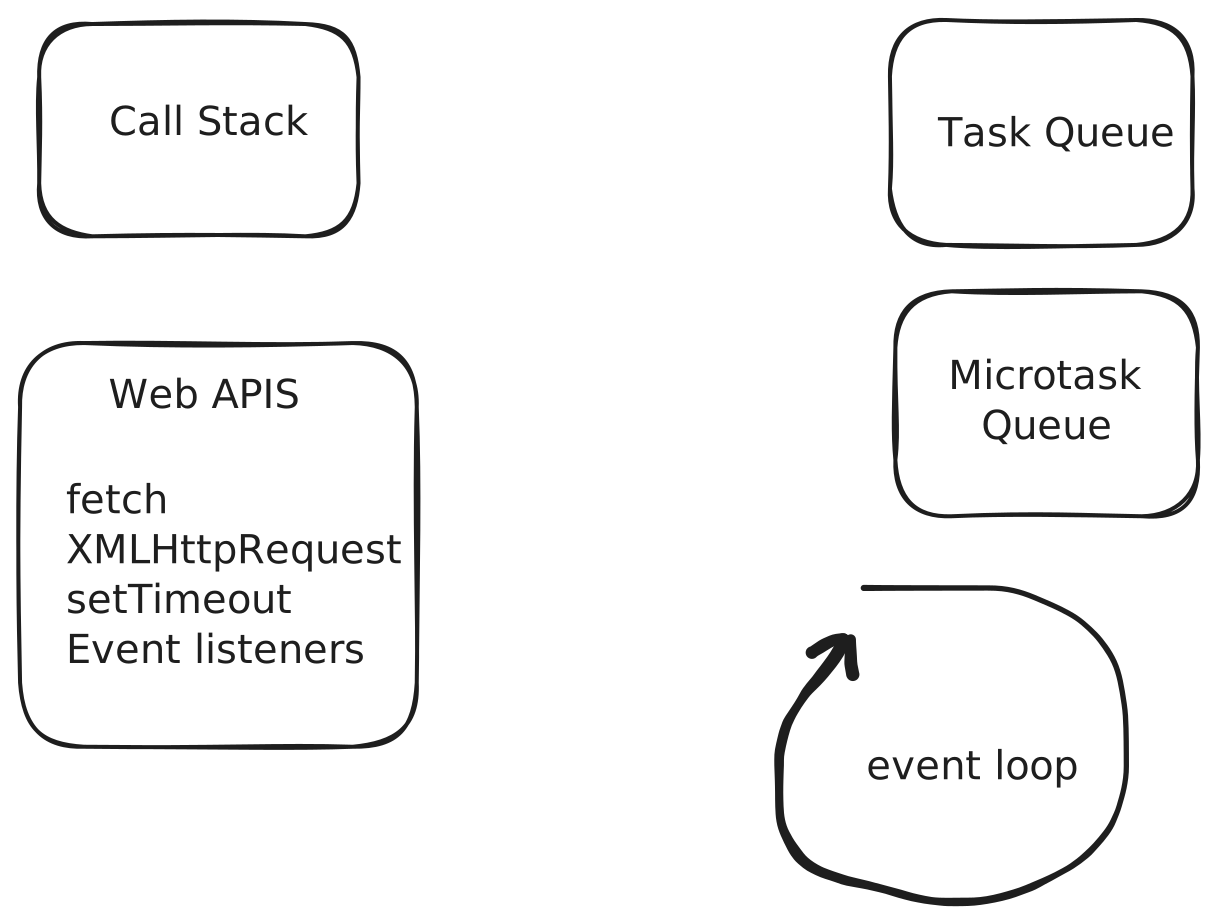
- Call Stack: stores synchronous tasks. It is where currently executing functions live. When a function is called, it is pushed onto the stack; when it finishes, it is popped.
- Web APIs: browser-provided APIs that handle async tasks (setTimeout, fetch, XMLHttpRequest, etc.). These run in the background without blocking the main thread.
- Task Queue: also called the callback queue or macro task queue. It stores async macro tasks. When an async task completes (for example, a timer fires), the task is queued here.
- Microtask Queue: stores microtasks. Microtasks run before macro tasks and are often used for work that should run soon (before rendering) but not synchronously.
- Event Loop: the core of the system. It monitors the call stack and the task queues (macro and micro). When the call stack is empty, it pulls a macro task and executes it.
Common macro tasks
- script execution (code in a
<script>tag counts as a macro task) - MessageChannel
- setTimeout callback
- setInterval callback
- user interaction callbacks (click, scroll, keyboard input, etc.)
- network request callbacks
- file IO callbacks
Common microtasks
- Promise callbacks
- MutationObserver callbacks
We can represent the event loop with the following pseudocode:
function eventLoop() {
  const macroTaskQueue = []; // Macro task queue
  const microTaskQueue = []; // Microtask queue

  // Exhaust the microtask queue
  function exhaustMicroTaskQueue() {
    while (microTaskQueue.length !== 0) {
      const microTask = microTaskQueue.shift(); // Pop a microtask FIFO
      // Push the callback onto the call stack and run it
      runToCompletion(microTask);
    }
  }

  // The event loop runs forever
  while (true) {
    /**
     * Take one macro task from the queue
     * The call stack must be empty, otherwise no macro task is taken
     * */
    const macroTaskCallbacks = macroTaskQueue.shift();
    // A macro task can include multiple callbacks: e.g. multiple listeners for a click event (event bubbling)
    for (let i = 0; i < macroTaskCallbacks.length; ++i) {
      // Execute the macro task callback
      const macroTaskCallback = macroTaskCallbacks[i];
      // Push the callback onto the call stack and run it
      runToCompletion(macroTaskCallback);
      // After each macro task callback, exhaust the microtask queue
      exhaustMicroTaskQueue();
    }
  }
}
In the following example, when you click the inner element, what will be logged to the console?
function App() {
  useEffect(() => {
    const outer = document.getElementById("outer");
    const inner = document.getElementById("inner");
    const handleOuterClick = () => {
      console.log("outer clicked");
      Promise.resolve().then(() => {
        console.log("outer promise");
      });
    };
    const handleInnerClick = () => {
      console.log("inner clicked");
      Promise.resolve().then(() => {
        console.log("inner promise");
      });
    };
    if (outer && inner) {
      outer.addEventListener("click", handleOuterClick);
      inner.addEventListener("click", handleInnerClick);
    }
    return () => {
      if (outer && inner) {
        outer.removeEventListener("click", handleOuterClick);
        inner.removeEventListener("click", handleInnerClick);
      }
    };
  }, []);
  return (
    <div id="outer">
      <div id="inner">click me</div>
    </div>
  );
}
The correct answer is:
inner clicked
inner promise
outer clicked
outer promise
Why?
- We register two event listeners: one for the outer element, one for the inner element.
- When we call
addEventListener, the callback is registered with the Web APIs. When the event fires, the event callback is queued in the macro task queue. - When we click the inner element, the click event is triggered. The browser's internal event dispatcher enqueues the task to handle the click into the macro task queue (callback queue) (only one macro task).
- The event loop pulls that macro task and pushes its callbacks (two in this case) onto the call stack one by one.
- Each callback can enqueue microtasks (like
Promise.resolve().then()). - After the macro task callbacks finish, the microtask queue runs.
A few important notes:
- The event loop is event-driven: each event (like a click) corresponds to a macro task.
- All listeners for the same event are part of the same event handling process; the browser invokes them in order during that macro task.
- Event dispatch and listener invocation happen within the same macro task.
Rendering
So far we have not touched rendering. How does rendering happen?
Rendering pipeline
A rendering pass generally includes these steps:
- Build the DOM tree
- Build the CSSOM tree
- Combine DOM and CSSOM into the render tree
- Generate the layout tree from the render tree
- Generate paint records and paint into layers
- Composite and display: submit paint records to the compositor thread, which submits to the GPU for display
Most of this work (1-5) happens on the main thread. If the main thread is blocked, rendering is blocked. The event loop exists to minimize blocking and keep rendering smooth.
When rendering happens
Rendering is part of the event loop. Before each loop iteration ends (one iteration is a tick), the browser checks whether it should render. Rendering usually depends on:
- It is time to render: this is tied to the screen refresh rate. For example, at 60Hz the screen refreshes every 16.67ms, and the browser checks before each event loop tick ends.
Event loop with rendering
Here is the event loop pseudocode including rendering:
function eventLoop() {
  const macroTaskQueue = []; // Macro task queue
  const microTaskQueue = []; // Microtask queue
  const rAFQueue = []; // requestAnimationFrame queue

  // Exhaust the microtask queue
  function exhaustMicroTaskQueue() {
    while (microTaskQueue.length !== 0) {
      // Pop a microtask FIFO
      const microTask = microTaskQueue.shift();
      // Push the callback onto the call stack and run it
      runToCompletion(microTask);
    }
  }

  // The event loop runs forever
  while (true) {
    // Take one macro task from the queue
    const macroTaskCallbacks = macroTaskQueue.shift();
    // A macro task can include multiple callbacks: e.g. multiple listeners for a click event (event bubbling)
    for (let i = 0; i < macroTaskCallbacks.length; ++i) {
      const macroTaskCallback = macroTaskCallbacks[i];
      // Push the callback onto the call stack and run it
      runToCompletion(macroTaskCallback);
      // After each macro task callback, exhaust the microtask queue
      exhaustMicroTaskQueue();
    }

    /**
     * Check whether it is time to render a new frame
     * This depends on screen refresh rate, e.g. 60Hz means every 16.67ms
     * */
    if (isItTimeForNextFrameRender()) {
      // Take requestAnimationFrame tasks (possibly multiple) and run them
      for (let i = 0; i < rAFQueue.length; ++i) {
        const rAFTask = rAFQueue[i];
        // Push the callback onto the call stack and run it
        runToCompletion(rAFTask);
        // After each requestAnimationFrame callback, exhaust the microtask queue
        exhaustMicroTaskQueue();
      }

      // Render if there are changes
      render();
    }
  }
}
When microtasks run As long as the call stack is empty, microtasks run until the microtask queue is empty. In the pseudocode above, you can see:
- After each macro task callback (a macro task may have multiple callbacks), the current microtask queue is exhausted.
- After each requestAnimationFrame callback (the call stack is empty), the current microtask queue is exhausted.
Event loop summary
Each event loop tick roughly works like this:
- If the call stack is empty, take a macro task and push each callback onto the call stack to execute.
- After each macro task callback, exhaust the microtask queue created by that callback.
- Check if it is time to render a new frame. If so, push requestAnimationFrame callbacks onto the call stack.
- After each requestAnimationFrame callback, exhaust the microtasks it created.
- Render (if needed).
Now, using what we learned, try answering: what ends up being rendered on screen?
setTimeout(() => {
  console.log("timeout 1");
  document.body.innerHTML = "A";
});

requestAnimationFrame(() => {
  console.log("requestAnimationFrame");
  document.body.innerHTML = "B";
});

setTimeout(() => {
  console.log("timeout 2");
  document.body.innerHTML = "C";
});

console.log("script");
document.body.innerHTML = "D";
The correct answer: in most cases it is B, but it can also be C.
Why?
requestAnimationFramecallbacks run before the next render.- Rendering depends on the screen refresh rate. In most cases D, A, and C already ran, but it's not yet time to render, so B is rendered (and only once).
- It can also be C if the timing happens to hit a render boundary: B will show first, then C (multiple renders).